-
Access keys for Microsoft 365 / Office 365 OAuth2 renewed there where expired.
-
SuperMailer checks now DMARC und SPF record of sender domain, this should be set for better email delivery.
-
Script for tracking, newsletter archive now PHP 8.3 compatible.
-
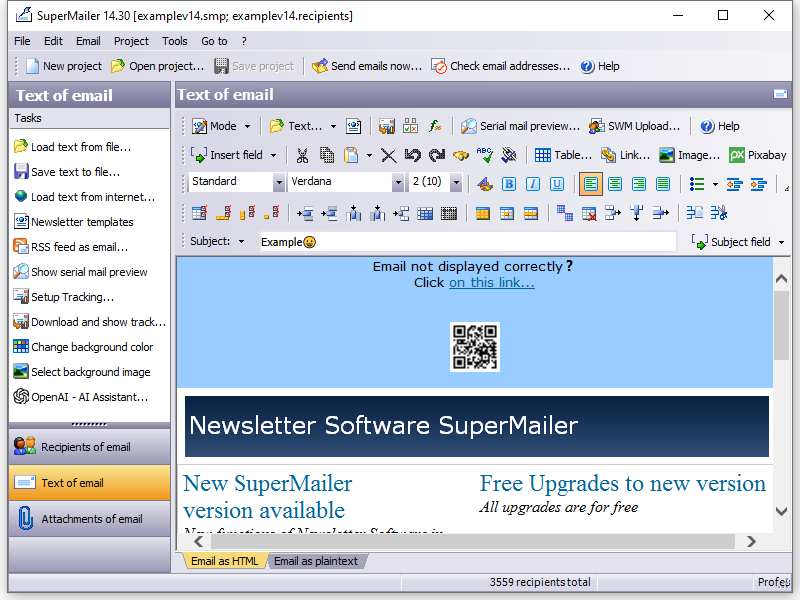
SuperMailer can now create QR codes itself and embeds it to HTML email.
-
Bugfixes for MySQL API for saving/retrieving newsletter recipients in MySQL databases.
-
At self constructed attachments now QR codes with Google API URL allowed.
-
Personalized attachments as HTML or plain text can now converted as PDF file with/without digital signature (Edge/WebView2 required).
-
There are new default placeholders [~ID~] for ID of recipient in SuperMailer recipients database and [~SUBJECT~] for subject of email to use in HTML or plain text part email.
-
At OpenOffice/LibreOffice plaholders in hyperlinks are correctly replaced when they are located behind an image.
-
More than one SMTP servers with limits can now saved as file and loaded in another project.
-
Fixes bugs with bzip2 compression and PHP 8 with send variant over webspace/dedicated server.
-
Fixes bugs with surveys and PHP 8.x.
-
Imports HTML code from Excel files correctly.
-
Webbased tracking statistics now contains charts for openings of email and clicks to hyperlinks in email.
-
Survey results can now viewed in browser, not in SuperMailer only.
-
Newsletter sending can now be limited to some days and a time.
-
Fixes a bug in plain source editor, it crashes when a style sheet with "*" is included.
-
Changed permissions of app for sending newsletters with Microsoft Office 365
cloud, so administrator consent should not be necessary.
- Fixes a GPF with send variant
Microsoft Cloud/Office 365.
-
Fixes problems with Microsoft Edge/Webview2 and SuperMailer in wizard-mode.
-
Fixes a program crash when Windows font Consolas is not
installed on Windows OS.
-
Fixes wrong calculation of row height in newsletter
recipients list with high dpi rates.
- Fixes a GPF with send variant
Microsoft Cloud/Office 365.
-
SuperMailer supports now modern authentication with OAuth2 for Microsoft Office 365 school/business accounts and personal account hotmail.com, live.com....
to send emails per SMTP or retrieve newsletter
subscriptions/unsubscriptions with IMAP protocol.
-
Modern authentication with OAuth2 is also supported by
Google Mail, you must create an own OAuth2
authentication app in Google cloud.
-
This version doesn't run on Windows XP anymore, minimum
requirement is Windows Vista.
-
SuperMailer checks for "Phishing" links when you create
a link in SuperMailer. Phishing = displayed link is not
equal target of link.
-
New default field [~EMail~]. It references ever selected
field with email address, name of field must be not
equal with EMail.
-
Fixes many errors with Microsoft Edge with WebView2. For
modern authentication with OAuth2 you should use
Microsoft Edge with WebView2.
-
Many other bug fixes and improvements...
-
Microsoft newrelease_olderwith WebView2 control is now used for all web content when Microsoft Edge and WebView2 is installed.
On computers without Edge or
to old Windows version Internet Explorer is used as before.
-
You can now insert emoji icons in email subject line and email text.
-
Content of HTML email can now be added as PDF attachment or screenshot, requires Microsoft Edge and WebView2.
-
For Teams: Newsletter recipients can now be saved in an own MySQL database, so more than one SuperMailer user can use same email recipients.
-
Recipients can now have colored category names.
-
Many improvements and a new default template for Wizard/Inplace editor.
-
Improvements in WYSIWYG editor for HTML table handling.
-
Many other bug fixes...
-
Build 2301:
-
Newsletter archive is at this version completely
modernized, it contains now a top bar with links to
years, newsletter entries, RSS-Feed, translation and
social networks.
-
Alternative browser link/online version of
newsletter can now also have a top bar with links to
newsletter archive, translation, subscribe to newsletter.
-
There are new internal functions for mathematical and
string operations, date/time calculations and formatting
numbers.
-
RSS-Feed2EMail function improved at this version more
than one [rss_channel_items] [/rss_channel_items] blocks
are allowed, e.g. for responsive newsletters.
-
Improvements for importing recipients from Microsoft
Excel or OpenOffice/LibreOffice, SuperMailer doesn't use
clipboard anymore.
-
Fixes time zone problems with individual iCalendar
attachments on none Windows systems.
-
May other bugfixes and improvements....
-
Build 2241: Fixes an error with CSS background images
when newsletter template is loaded from file.
-
Now variants of email subject can be defined which can be used frequently or
randomly.
-
While sending newsletters and serial emails with SMTP
server emails can be achieved for later use.
-
At hyperlink dialog you can change color, font or
underlining of a hyperlink directly.
-
New internal functions
sf_tld() to get top level domains and for random strings:
sf_rand_string_mixed(), sf_rand_string_uppercase(),
sf_rand_string_lowercase() and sf_rand_string_from_array()
-
Hyperlinks with placeholders in
personalized Word, Excel, Writer and Calc documents now
replaced correctly in all document parts.
-
Bugfix in HTML code of newsletter email when style=""
contains a font-family: property with a font with blanks.
-
Build 2202: Bugfix for endless loop while importing
recipients when there are more than one recipients group
exists.
-
Build 2204: Moving/Copying recipients between projects
works now as before.
-
Fixes the error "ErrorParticipantDoesntHaveAnEmailAddress, A participant without an email address is not allowed for Reply To Property" while sending
via Office 365 without a Reply-To email address.
-
Import from Google contacts should now work again.
-
SuperMailer now supports self-constructed text based personalized attachments. This feature can only be used for text files or HTML files.
-
Fixes errors while pasting formated text from Word or Outlook, some comments wasn't removed completely.
-
Newsletter templates created in Word can now be loaded
directly, "Text..." - "load", Word 2007 and newer
required.
-
Fixes an error while sending emails with Microsoft
Cloud/Office 365, inline images are not shown inline in
all email clients.
-
Wildcard characters *, ? are now allowed for
personalized attachments, so more than one file can be
send as attachments to one recipient.
-
Now there are internal function for e.g. encoding link
parameters url encoded or base 64 encoded.
-
At this time more than one Reply-To email addresses
delimited by comma are allowed.
-
There are now new placeholders [EMail_LocalPart] and [EMail_DomainPart]
to show local and domain part of email address in text
of newsletter. Other new placeholders are for date and
time [Year], [Month], [Day], [WeekNumber], [Hour],
[Minute] and [Second].
-
Only for professionals: in Menu Tools - Options you can
now activate an option to encode plain text and HTML
part base64, not quoted printable.
-
For FTPS connections are now encryption with TLSv1 and
newer supported.
-
and many other bug fixes...
-
Bugfix: mailto: links can now inserted by Link dialog as before.
-
Changing image size with keeping aspect ratio in WYSWYG editor works now also in Windows XP SP2, Vista and 7 with Internet Explorer older than 9.0.
-
SuperMailer projects with embedded images and attachments can now be saved and loaded to/from Dropbox, GoogleDrive, Box, OneDrive or WebDAV servers. All files will
be in one save 256 bit-AES encrypted archive file.
-
All images in WYSIWYG editor resized by mouse are now resized by aspect ratio, optionally you can resample and save image with new size.
-
At this version personalized iCalendar attachments can be created and send with newsletter.
-
Update libraries for SSL and SQlite database access, because this files contains security leaks.
-
SuperMailer can now be used with Outlook 2019.
-
All PHP scripts for tracking, newsletter archive... are
compatible with PHP 7.3.
-
SuperMailer now supports more
secure SMTP authentication methods as LOGIN, because
many providers deactivates simple LOGIN method.
-
SuperMailer now supports List-Unsubscribe-Post
email header. You must use new version of
newsletter subscription/unsubscription
script and activate signing outgoing emails with a
DomainKey/DKIM signature.
-
Pixabay is now integrated, you can directly insert images from Pixabay in
your HTML newsletter.
-
Extensions for upcoming EU General Data Protection Regulation.
-
At this version you can import newsletter recipients from CRM Act!, from saved Google contacts and from saved Microsoft Cloud contacts (Exchange Online, Office 365, Hotmail.com, Live.com, MSN.com, Outlook.com oder Passport.com).
-
Now it is possible to send newsletter/serial mails over Microsoft Cloud server. This send variant should only be used for Office 365 School/Work accounts when you can't use
SMTP server smtp.office365.com, because sending is very slow and emails couldn't exceed 4MB.
-
Fixes many errors for creating personal attachments with OpenOffice/LibreOffice.
-
Gives a hint how solve the errors "Could not retrieve IMessage: Interface not supported" or access violation at address 00000000 while sending newsletters and
serial emails over Outlook. This error can occur after installing Windows 10 Creators Update. Office package must be repaired at Control Panel - Programs and Features to fix this error.
-
Fixes an error while uploading files with explicit SSL encrypted FTP connections.
-
Personalized attachments can now be created with OpenOffice/LibreOffice Writer-/Calc files.
-
In serialmail preview sender, recipient, Cc: and BCc: recipients now displayed.
-
Fixes many errors and extendes some functions for tracking and sending newsletters...
-
Fixes a bug "undefined property String" while opening HTML list properties dialog.
-
Fixes a bug while processing responsive stylesheets when there are more than one identical @media queries in HTML source code.
-
Fixes a critical bug in a list with radio buttons,
windows with this list are not been shown.
-
With proxy setting "Take settings from windows" now
detailed error messages are been shown.
-
Fixes display errors on high-DPI displays, font and
icons will now be resized correctly and buttons have a
clickable size.
-
While importing contacts from Outlook with Exchange you
can activate Exchange cache mode to increase import
speed for Office365 accounts.
-
For surveys you can save voting results for each
recipient and see it as result.
-
Fixes many other errors...
-
Fixes the error "Trial has expired" while using SFTP for uploading scripts and images.
-
A HTML table row with HTML content can no be copied or cut to clipboard and insert in another table or another position.
-
Debug code/message boxes removed while importing
contacts from Outlook
-
Fixes the error "EOF was observed that violates the protocol" while downloading files per https://
-
Fixes an error for surveys when a MySQL database should be used for saving results.
-
Fixes an error in font optimizer for HTML newsletters.
-
Fixes an error when newsletter templates should be loaded per https:// from internet.
-
SuperMailer now supports SFTP for uploading scripts for Tracking, Browserlink, Newsletter archive...
-
Link Tracking now supports IPv6 IP addresses when the webserver and PHP supports this.
-
At this version you can create simple surveys by inserting voting buttons as hyperlink or image.
-
Now you can export newsletter recipients to OpenOffice/LibreOffice directly.
-
and many other improvements and bug fixes
-
It's recommended to upgrade to this version because digital signatures will expire in May 2016.
-
Compatibility update for sending newsletters through
Outlook/Office 2016 32bit
-
For tracking links in newsletters all HTTP HEAD request
will be ignored by now.
-
Spam test now includes a Received header so this will
not cause spam points.
-
and many other improvements and bug fixes
-
Importing contacts and emails from primary Exchange accounts works now
correctly as before.
-
Importing contacts from Outlook 2003 with categories works now.
-
27. October 2015 Build 1683: Emails sent with Outlook
hasen't a sent date/time in Sent Items folder.
-
Improvements for Windows 10 Hi-Res
-
SuperMailer is now compatibility to Office/Outlook 2016.
-
Now you can define target groups and assign it to text blocks, images, tables or table rows to create more individual emails for each newsletter
recipient.
-
You can set up a Pre-Header/preview text for HTML emails this text will be shown by various email programs, e.g. Outlook or Thunderbird, for incoming emails. Pre-Header/preview text can improve opening rate of newsletters.
-
Instead of using a mailto: link in newsletters you can use a feedback script, which SuperMailer can setup up for you on your own webspace
with PHP support.
-
And many more improvements and bug fixes.
-
In Send options you can specify a HTTP request for updating an external CMS or customer database.
-
Optimizing HTML source code before email sending is not speeded up.
-
For mailto: Links a mailto: link generator is now included.
-
Improvements for automatic backup of recipients database.
-
SuperMailer supports now creating and sending newsletters in responsive design
completely. For newsletters in responsive design use
only this version, no older ones.
-
For HTML professionals now a plain HTML source editor is included, so your own HTML code will not be changed by integrated WYSIWYG editor.
-
All included sample HTML newsletter templates and template for newsletter archive are not created as responsive template.
-
Fixes many other errors and several improvements.
-
SuperMailer warns now when you save a project file on a network drive or
removable drive.
-
Fixes an errors while importing newsletter recipients from OpenOffice/LibreOffice Calc.
-
You can now find a newsletter recipient in all recipient groups, optionally.
-
Fixes errors and improvements in wizard/inplace editor for creating newsletters
per mouse clicks.
-
Fixes an error with commandline parameter /AUTORECIPIENTSGROUP.
-
File ChilkatDelphiXE.dll changed against a newer version, because Kaspersky detects it as dangerous DLL, its a false positive.
-
SuperMailer will now warn when you add unsecure attachments, e.g. .exe, .scr, .js, files.
-
In image properties dialog options are marked as incompatible to Outlook 2007 and newer.
-
Many bugfixes with wizard and rendering engine Internet Explorer higher 7.0.
-
HTML emails can now be created with a wizard (inplace
editor). For using wizard you must load a HTML template
with special tags, this tags are explained in program
help.
This function is not on Windows XP
available.
-
Background images and colors now set as stylesheet
additionally this avoids problems with Gmail.
-
At this version Outlook 2000 isn't supported anymore.
-
Fixes bugs with table cell merging, tracking and
browserlink.
-
Build 1504:
-
Fixes bugs while Internet Explorer 11 is installed (Windows 7 and newer).
-
Fixes bugs with email templates containing responsive CSS
and normal CSS in one <style> tag.
-
SuperMailer can now import VCF files with more than one contact entry, e.g. ownCloud creates this files.
-
SuperMailer can now create and send S/MIME signed emails or
add a Domain key signature to each email.
-
Email templates with CSS for responsive designs will now be
loaded correctly without damaging these stylesheets.
SuperMailer will add this stylesheets as new special
stylesheets entries.
-
SuperMailer will now optimize HTML code of newsletter for
better compatibility with various email programs,
especially Outlook 2007 and newer.
-
and many other improvements and bug fixes...
-
Removing hard bounce email addresses will now be quicker than before.
-
Replacement texts for newsletter personalization fields used in newsletter archive and alternative browser link are now handled correctly.
-
While editing a newsletter recipient you can save or edit recipient also to/in other recipient groups.
-
Solves problems with Internet Explorer 10 e.g. images or tables can't be resized.
-
Tracking statistics include now a preview of newsletter and an overlay with count of clicked hyperlinks.
-
Improvments of hard bounce detection and you can configure after how many hard bounces recipient will be removed from recipients list.
-
Text formattings can now be copied from one selection to another text.
-
and many other bug fixes...
-
Build 1391: Fixes a bug with file extensions while creating personalized attachments
-
Build 1392: Removing duplicate email addresses are now faster
-
Build 1393: Performance enhancements while importing recipients.
-
Build 1394: Performance enhancements while set checkmarks to recipients, fixes a bug while retrieving and removing hard bounces.
-
Build 1395: Fixes a bug while removing fields in newsletter recipients list and writing error text and sent date time of newsletter in recipients list.
-
Newsletter recipients of one SuperMailer project will now saved in an external SQLite database. You can use this SQLite for more than one project file
by assigning an existing recipients database.
-
SuperMailer can now be used with Office 2013 for sending HTML newsletters.
-
and many other bug fixes...
-
For tracking openings of newsletter or clicks on hyperlinks
in newsletters SuperMailer supports now UTF-8 encoding for
MySQL databases. MySQL database must be created with
utf8_unicode_ci encoding to get full support.
-
In plain text newsletters or plain text part of newsletter
all hyperlinks in <> will not be wrapped, so long
hyperlinks should be clickable in all email programs.
-
Solves problems at program start on old Windows XP with
Internet Explorer 6 systems.
-
Selecting a FTP directory works now correctly with passive
FTP connections, this option was ignored in older versions.
-
Old DOS/OEM files are now converted to Windows ANSI
correctly.
-
Accessing Microsoft FTP Servers and showing files and
directories are now correctly supported.
-
Editing newsletters with div blocks works now correctly as in older versions.
-
While sending newsletters with Outlook error 255 Unknown error, ProgID. "smredemp.SafeMailItem" can occur. SuperMailer suggests now to check Outlook version
and install correct SuperMailer variant as 32bit or 64bit version. With Outlook 2010 64bit you must use SuperMailer 64bit, all other versions require SuperMailer as 32bit variant.
-
On exiting SuperMailer an exception in file 'libeay32.dll' are raised, error will be ignored now.
-
While using more than one personalized attachment and attached files are not exists a wrong attachment was sent.
-
Hyperlinks with spaces encoded as %20 was incorrect changed to %%20 while using link tracking.
-
While importing Excel files the number 10 was removed from Excel sheet when option for removing CRLFs in Excel cells was checked.
-
SuperMailer is now as 32bit and 64bit variant available,
64bit variant can be used on Windows XP, Vista or 7 64bit
only.
64bit version should be used only, when
-
you use Microsoft Outlook 2010
64bit
-
you want import newsletter
recipients from Microsoft Access 2010 64bit databases
-
you want import from other
databases with 64bit drivers only.
-
Newsletter Software SuperMailer is now full Unicode
compliant all email encodings are now work correctly.
-
SuperMailer is now available as Freeware version for up to
100 newsletter recipients.
-
In newsletter text you can insert a QR code image e.g. for
coupons, URLs or plain text.
-
Spell checking and thesaurus can now be also used with
OpenOffice/LibreOffice.
-
For tracking newsletters with Microsoft SQL server the
driver Microsoft Drivers for PHP for SQL Server
will now be used when PHP function for MS SQL access not
available.
-
And many other enhancements and
improvements.
-
In version 5.70 no exception is raised when there are errors while creating or saving project file.
-
While saving project files SuperMailer will now check for correct writing of data, when there are not enough space left on device an exception will be raised.
-
Build 1212 (02. February 2012) Bugfix in email subject encoding when double quotation marks are used in subject line.
-
Build 1213 (09. February 2012) Bugfix while saving project unicode character are lost in email subject and newsletter text.
-
After saving program settings to use on an other computer database for global block list isn't activated again.
-
Fixes errors in encoding of email subject for emails with UTF-8 encoding.
-
To share your newsletter in social networks you can now insert a bar with various icons of social networks. You must have newsletter archiv installed to use this function.
-
While creating personalized attachments with Word or Excel file as template you must not install Ghostscript and RedMon when you want to send attachments as PDF file. SuperMailer
can now use the printer "Microsoft XPS Document Writer" to create PDF files directly (Office 2007 or newer only).
-
And many other enhancements and
improvements
-
This is the last version running on Windows 98, Me, NT4, Windows 2000 and newer. Next version will be run on Windows XP or newer only.
-
Fixes an error while importing recipients from Outlook, Excel..., the last recipient will now be imported correctly.
-
Fixes an error when setting an URL in picture properties dialog.
-
While inserting a table in newsletter text SuperMailer will now apply font styles to all table cells to prevent display problems in
various email programs.
-
Improves performance while importing newsletter recipients and showing newsletter recipients while changing recipients groups.
-
SuperMailer includes now 30 newsletter templates and a new preview window for newsletter templates.
-
Fixes a bug with sending BCc emails when using an outbox server with SSL.
-
Before sending newsletters SuperMailer will now check the script for unsubscribe link (menu Project - Unsubscribe link). You can create
an unsubscribe link while using the newsletter subscribe/unsubscribe script.
-
You can insert now a Facebook "Like" button with an URL. Newsletter recipients can click on this button in newsletter directly.
-
While inserting a table in newsletter text SuperMailer will now apply font styles to all table cells to prevent display problems in
various email programs.
-
Uses now new API of URL shortener service bit.ly because old API returns a 404 error so SuperMailer doesn't uses returned URL for posting
a twitter tweet or facebook status message while sending new newsletter.
-
While using proxy setting "Windows default proxy settings" username and password for password protected websites are now requested.
-
In HTML editor all table columns and rows
can now be resized with mouse directly.
-
In query functions the functions "contains",
"contains not" and "starts with" can be used instead of
wildcards (*, ?)
-
List of newsletter recipients can now be
exported to Excel directly.
-
Newsletter Software SuperMailer can now
post a Facebook status message with new newsletter entry in
newsletter archive.
-
Recipients tracking and browser link to
view newsletter in browser of recipient can now used
together.
-
Links with https:// can now be tracked.
-
URLs with https:// can now be used for
uploading images, updateing newsletter archive, browserlink
and tracking.
-
All script, object, embed HTML tags where now removed from HTML code of newsletter because this tags will not be shown in email clients or newsletter will be blocked completely.
-
And many other bug fixes...
-
Build 1113: Solves problems with UTF8 encoded emails
-
Solves problems with personalized attachments when there are not exists.
-
Tag <content:encoded> in RSS feeds are now evaluated and can be used in newsletter texts with placeholder [rss_channel_item_content_encoded].
-
Solves problems while convert HTML part of email to plain text part of email when URLs to files e.g. PDF files are included.
-
Changes on tracking scripts for PHP 4 versions to detect
user agent and operating system of newsletter recipient.
-
DLL files are now loaded from SuperMailer directory to prevent the known security leaks with DLL files.
-
Solves problems while retrieving short URL for posting a
twitter tweet.
-
Includes new authentication protocol (OAuth) for posting
twitter tweets.
-
While using tracking Newsletter software SuperMailer will
now also determine user agent (used email client or browser)
and used operating system of newsletter recipient.
-
While sending newsletters you can pause email sending
temporally.
-
Build 1041: Solves problems with tracking that occurs with different PHP versions
-
Compatibility Update for Outlook 2010 32bit. When you
install Outlook 2010 32bit you must also reinstall
SuperMailer.
You can't send HTML newsletters when you use Outlook 2010
64bit, but you can import newsletter recipients from Outlook
2010 64bit local contact folders.
-
Global block list uses now a database so more than one user
can have access at the same block list file.
-
When you use menu Edit - Clear email texts you can now
archive the email text for later newsletters.
-
In personalized attachments with Word or Excel you can now
use query functions as placeholders e.g. to build
salutation. You can also specify a filename for attachment
which should be showed as attachment name in email program.
-
While using spellchecking you can now add new words to word
user dictionary.
-
Text blocks can now have a condition optionally for
inserting content of text block in newsletter text.
-
At this version SuperMailer can add tags to hyperlinks so
you can use Google Analytics for analyzing clicks on
hyperlinks with Google Analytics.
-
While inserting text from clipboard SuperMailer will show a
warn message because formatted texts of Word or Outlook will
be not displayed correctly in many email programs. You can
select to insert text as formatted text or as plain text.
-
And many more bug fixes...
-
With new RSS2Email function you can send new RSS feed entries as
email. You must create a newsletter template file
(information in help file and sample template file in
program folder) and let SuperMailer import new RSS feed
entries e.g. from a RSS feed created by a Blog.
-
SuperMailer now creates plain text part automatically from
HTML part. You can deactivate this function e.g. to use ever
a browser link for showing newsletter in web browser.
-
For German users only: SuperMailer can now update email
history of each recipient in
SuperMailingList (Version 1.61 or newer required).
This option must be enabled in menu Project - Send settings.
-
In Import dialog in each list for assigning recipient data
to SuperMailer fields you can use context menu to assign
fieldnames with same name automatically.
-
By using function to delete email text completely (menu
Edit) now email subject and attachments are also removed..
-
While importing newsletter recipients form Outlook all
category names now sorted alphabetically.
-
When you let SuperMailer import newsletter recipients from
Outlook contact folder on opening project file automatically
SuperMailer doesn't crashes anymore when Outlook contact
folder doesn't exists.
-
While retrieving newsletter subscriptions / unsubscriptions
from an Outlook mail folder all emails with attachments now
ignored.
-
SuperMailer now ignores all permission error messages while
enumerating Exchange-public folders to let an user with low
rights also import from specific public contact folder.
-
Text alignment "justify" is not realized with a style sheet
in WYSIWYG editor because Outlook 2007 doesn't support the
normal HTML tag.
-
Now the first column while importing newsletter recipients
from Open Office Calc is imported completely.
-
And many more bug fixes...
-
Build 981:
-
Build 983:
-
While importing newsletter recipients removing of CRLFs in
Excel cells can be deactivated in import dialog.
-
SuperMailer now supports List-Unsubscribe email header entry
to unsubscribe from newsletters directly e.g. in Microsoft
Hotmail. This entry can only be used while using SuperMailer newsletter subscribe/unsubscribe
script.
-
While updating newsletter archive you can also post a
Twitter message with new newsletter entry in archive.
-
Tracking statistic shows now only up to 25 links all other
statistics must be reviewed in browser with script
webstat.php.
-
While exporting newsletter recipients data the export file
will be written directly to hard disc to solve problems with
low memory.
-
Many other bug fixes....
-
Build 958:
-
Fixes an error with link tracking,
ID = -1, when web server inserts spaces to results.
-
Outlook/Exchange category now
sorted by name.
-
Before importing newsletter recipients from Excel all CRLFs
will be removed from Excel cells to solve problems while
importing recipients.
-
Spam test to test newsletters is now also available while
using send variant "with Outlook".
-
Outlook 2007+
compatibility check will now also work with send variants
"with Outlook" and sending emails with PHP Script on own web
server / web space.
-
Some HTML design elements now marked as "not supported by
Outlook 2007+", you not use this longer in newsletters.
-
Before sending emails you can use Outlook 2007+
compatibility check to check your newsletter text for
incompatible HTML and CSS elements.
-
Properties for HTML lists can now be changed, e.g. define
other list styles or numberings.
-
Properties of paragraphs can now be changed, e.g. define
word spacing or change line spacing.
-
While creating plain text part of newsletter from HTML part
all direct hyperlinks will be shown once a time.
-
Newsletter archive can now be showed as RSS feed. Use
parameter showRSS=1 to let the newsletter archive be shown
as RSS feed instant of HTML variant. With parameter showAll=1
you can let show all newsletter entries of all years as RSS
feed.
-
Email attachments can now be compressed as ZIP file before
sending it.
-
After retrieving hard bounce emails a summary table with all
removed newsletter recipients will be shown.
-
While using link tracking you can now use fields for
personalization in hyperlinks.
-
And many other bug fixes...
-
After updating to Internet Explorer 8.0 design time table
cells are invisible this problem is now fixed.
-
Now you can import Outlook contact items from every Outlook
folder of type "Contact".
-
Auto importing function can now be deactivated in import
dialog.
-
Newsletter link tracking window has now a new layout for
better viewing statistics while using long link descriptions.
-
While using personalized attachments with Word documents
placeholders in head and foot line are replaceable.
-
You can now specify an envelope/bounce e-mail address
separately.
-
In WYSIWYG HTML editor now more text formatting available.
-
Email attachments can now be added with Drag'n drop.
-
Dynamic text blocks (from a database) can now have text with
more than 255 characters.
-
Many other bug fixes...
-
Build 910: Speeds up WYSISWYG HTML editor when many
<span...> or <font...> tags are included in newsletter text.
A message is fired after dragging attachments to SuperMailer
main window.
-
Build 912: Fixes bugs while importing from Outlook.
-
Text from Word will be cleaned while pasting to SuperMailer
HTML editor. This gives better HTML code.
-
In query functions 2 additional conditions now possible.
-
While importing newsletter recipients from plain text files
or Excel files the fields can be assigned to SuperMailer
fields.
-
Various changes on link tracking.
-
Changes on alternative browser link, unsubscribe link and
text blocks are written to a file separately therefore the
link will be shorter.
-
And other bug fixes
-
Solves problems while importing recipients from
PPHP Mailing List Management Software SuperMailingList.
-
Newsletter subscriptions are handled correctly when emails
are UTF-8 encoded, e.g. for Russian, Polish or Czech
-
Solves problems with link tracking when quotes are used in
description of links.
-
Various bug fixes and extensions for link tracking
-
Solves problems while creating personalized attachments with
Excel
-
07. November Bug fix script error in script webstat.php for
missing function quote()
-
SuperMailer-Bounce for retrieving undeliverable emails are
now included in SuperMailer. At top of recipients list you
can click on "Bounces" to retrieve bounced emails.
-
Import function "from SuperMailingList" is now activated.
PHP Mailing List Management Software SuperMailingList is
at this time only in German language available.
-
Query functions can now be called recursively. Count of
iterations are limited to 32 loops.
-
Field checking can now be disabled in options. This function
should only be disabled if you have checked your send email
for each recipient.
-
At this version personalized attachments will only be send
if the specified file really exists.
-
When there are more than one outbox servers (SMTP servers)
is defined than you can check the option to use the server
again in a loop or randomly.
-
At menu Edit - "Clear email texts" you can clear the HTML
part and plaintext part completely, also defined style
sheets will be removed.
-
With new button "Highlight text" you can set the background
color of selected text it is not necessary to set the
style sheet in source code directly.
-
All in document used colors will be shown in color select
dialogs.
-
At dialog image properties you can find now a new button
"Resize image" to resize the image directly or save it in
correct color mode.
-
The fill function can now optionally fill a field with hash
or base64 encoded value to create an unique ID.
-
In dialog send settings you can now enable a new limit to
let SuperMailer send a count of emails in a specified time
only.
-
Bug fixes:
-
Solves an error while reopening a
project over menu File - Reopen and the current project
was not saved.
-
Blank lines in newsletter archive
are now ignored therefore no exception will occur again.
-
Colors defined in CSS short form
e.g.
#CCC or with rgb(value, value, value) are now correct
interpreted.
-
The PHP script for sending emails
over web space / dedicated server has converted carriage
returns not correctly therefore problems with Postfix
MTAs are occurred.
-
and others
-
Build 842: When more than one outbox
server with random usage is specified SuperMailer ends in an
endless loop.
-
New button "Outlook 2007 preview" in
serial mal preview window. Now you can see how your
newsletter text is showed in Outlook 2007 (Word 2000 or
newer required);
Changes on newsletter archive
query function identifiers can be
replaced with static texts new newsletter archive entries
are placed at the beginning of list newsletter archive files are
downloaded via FTP, when FTP Upload is configured.
This solves problems while downloading .dat files on
a windows server
Alternative browser link changed now
query functions can be included in the link
Solves problems with all PHP scripts
(Tracking, Newsletter archive, Alternative browser link,
Send emails with PHP script on own Webspace);
Microsoft SQL Server 2005 and newer
support for tracking function; A table prefix can be used for
installation of tracking function; Now .eml files (RFC 822) and Outlook
.msg files can be loaded directly as newsletter
template; HTML to plain text converter now
supports links that are located behind linked text or
pictures; In query functions HTML code can be
used; By importing Outlook contacts you can
also import the category name; Is Outlook 2007 installed than the
category names in import dialog will be readed when you
click on "from Outlook" or "from Outlook with Exchange"; Importing contacts of public Exchange
folders are now completely rewritten to ensure
importing of correct values; When you add new newsletter
recipients manually than you can save copies to another
recipients group; Newsletter subscriptions and
unsubscriptions can now be written directly to a SQL
database table; Sorting of recipients list fixed,
unicode characters are destroyed when you click on the
header of recipients list;
|

 German version
 Newsletter Software SuperMailer
 FollowUpMailer
 SMSout
 BirthdayMailer
 SerialLetterAndFax
 LANMailServer
 PHP
SuperMailingList
PHP
SuperMailingList PHP
Newsletter Software SuperWebMailer
PHP
Newsletter Software SuperWebMailer SuperSpamKiller
Pro
SuperSpamKiller
Pro RSSWriter